
Currently Empty:

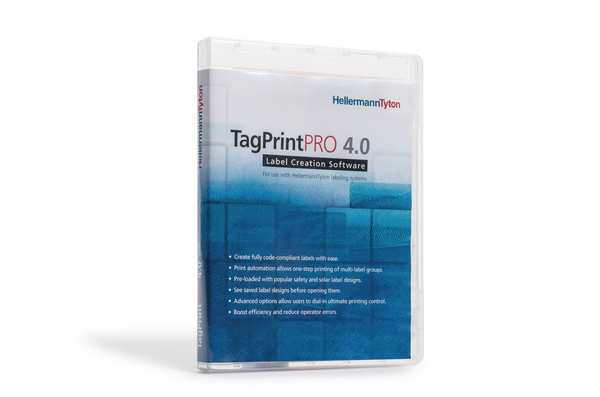
Label design software TagPrint Pro 4.0, 10 – 25, Network User Upgrade
TagPrint Pro 4.0 runs on Windows 7, 8.1 and 10, allowing full compatibility and error-free operation with the most widely used systems | Print automation allows one-step printing of label jobs ? even multi-label groups ? to one or more printers simultaneously | Visual preview allows users to see label designs before opening them | Single-user and network-user versions accommodate the needs of any size operation | Select saved labels visually or by part number | Convert existing XMT files to the TagPrint data table
Label design software TagPrint Pro 4.0, 10, Network User
TagPrint Pro 4.0 runs on Windows 7, 8.1 and 10, allowing full compatibility and error-free operation with the most widely used systems | Print automation allows one-step printing of label jobs ? even multi-label groups ? to one or more printers simultaneously | Visual preview allows users to see label designs before opening them | Single-user and network-user versions accommodate the needs of any size operation | Select saved labels visually or by part number | Convert existing XMT files to the TagPrint data table
Label design software TagPrint Pro 4.0, 25, Network User
TagPrint Pro 4.0 runs on Windows 7, 8.1 and 10, allowing full compatibility and error-free operation with the most widely used systems | Print automation allows one-step printing of label jobs ? even multi-label groups ? to one or more printers simultaneously | Visual preview allows users to see label designs before opening them | Single-user and network-user versions accommodate the needs of any size operation | Select saved labels visually or by part number | Convert existing XMT files to the TagPrint data table
Label design software TagPrint Pro 4.0, 3 – 5, Network User Upgrade
TagPrint Pro 4.0 runs on Windows 7, 8.1 and 10, allowing full compatibility and error-free operation with the most widely used systems | Print automation allows one-step printing of label jobs ? even multi-label groups ? to one or more printers simultaneously | Visual preview allows users to see label designs before opening them | Single-user and network-user versions accommodate the needs of any size operation | Select saved labels visually or by part number | Convert existing XMT files to the TagPrint data table
Label design software TagPrint Pro 4.0, 3 – 5, Network User Upgrade
TagPrint Pro 4.0 runs on Windows 7, 8.1 and 10, allowing full compatibility and error-free operation with the most widely used systems | Print automation allows one-step printing of label jobs ? even multi-label groups ? to one or more printers simultaneously | Visual preview allows users to see label designs before opening them | Single-user and network-user versions accommodate the needs of any size operation | Select saved labels visually or by part number | Convert existing XMT files to the TagPrint data table
Label design software TagPrint Pro 4.0, 3, Network User
TagPrint Pro 4.0 runs on Windows 7, 8.1 and 10, allowing full compatibility and error-free operation with the most widely used systems | Print automation allows one-step printing of label jobs ? even multi-label groups ? to one or more printers simultaneously | Visual preview allows users to see label designs before opening them | Single-user and network-user versions accommodate the needs of any size operation | Select saved labels visually or by part number | Convert existing XMT files to the TagPrint data table
Label design software TagPrint Pro 4.0, 5 – 10, Network User Upgrade
TagPrint Pro 4.0 runs on Windows 7, 8.1 and 10, allowing full compatibility and error-free operation with the most widely used systems | Print automation allows one-step printing of label jobs ? even multi-label groups ? to one or more printers simultaneously | Visual preview allows users to see label designs before opening them | Single-user and network-user versions accommodate the needs of any size operation | Select saved labels visually or by part number | Convert existing XMT files to the TagPrint data table
Label design software TagPrint Pro 4.0, 5, Network User
TagPrint Pro 4.0 runs on Windows 7, 8.1 and 10, allowing full compatibility and error-free operation with the most widely used systems | Print automation allows one-step printing of label jobs ? even multi-label groups ? to one or more printers simultaneously | Visual preview allows users to see label designs before opening them | Single-user and network-user versions accommodate the needs of any size operation | Select saved labels visually or by part number | Convert existing XMT files to the TagPrint data table
Label design software TagPrint Pro 4.0, 50, Network User Upgrade
TagPrint Pro 4.0 runs on Windows 7, 8.1 and 10, allowing full compatibility and error-free operation with the most widely used systems | Print automation allows one-step printing of label jobs ? even multi-label groups ? to one or more printers simultaneously | Visual preview allows users to see label designs before opening them | Single-user and network-user versions accommodate the needs of any size operation | Select saved labels visually or by part number | Convert existing XMT files to the TagPrint data table
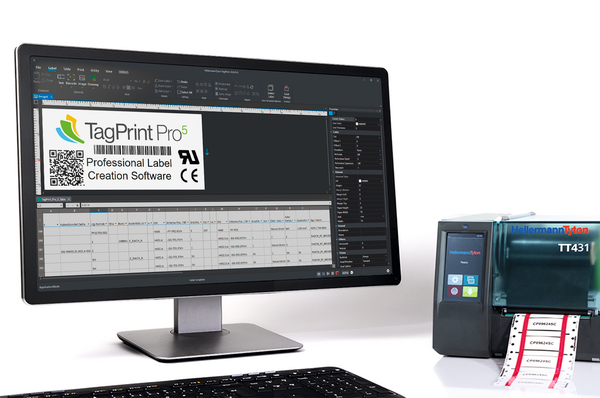
Label design software TagPrint Pro 5
Intuitive user interface with a modern design | Innovative template wizard for a quick start | Text, graphic and barcode functions | Open Excel files – no import needed | New file format for combining layout and data | Printing on multiple devices simultaneously | Project explorer for automated printing processes | Multilingual user interface
Label design software TagPrint Pro 5
Intuitive user interface with a modern design | Innovative template wizard for a quick start | Text, graphic and barcode functions | Open Excel files – no import needed | New file format for combining layout and data | Printing on multiple devices simultaneously | Project explorer for automated printing processes | Multilingual user interface
Label design software TagPrint Pro 5
Intuitive user interface with a modern design | Innovative template wizard for a quick start | Text, graphic and barcode functions | Open Excel files – no import needed | New file format for combining layout and data | Printing on multiple devices simultaneously | Project explorer for automated printing processes | Multilingual user interface